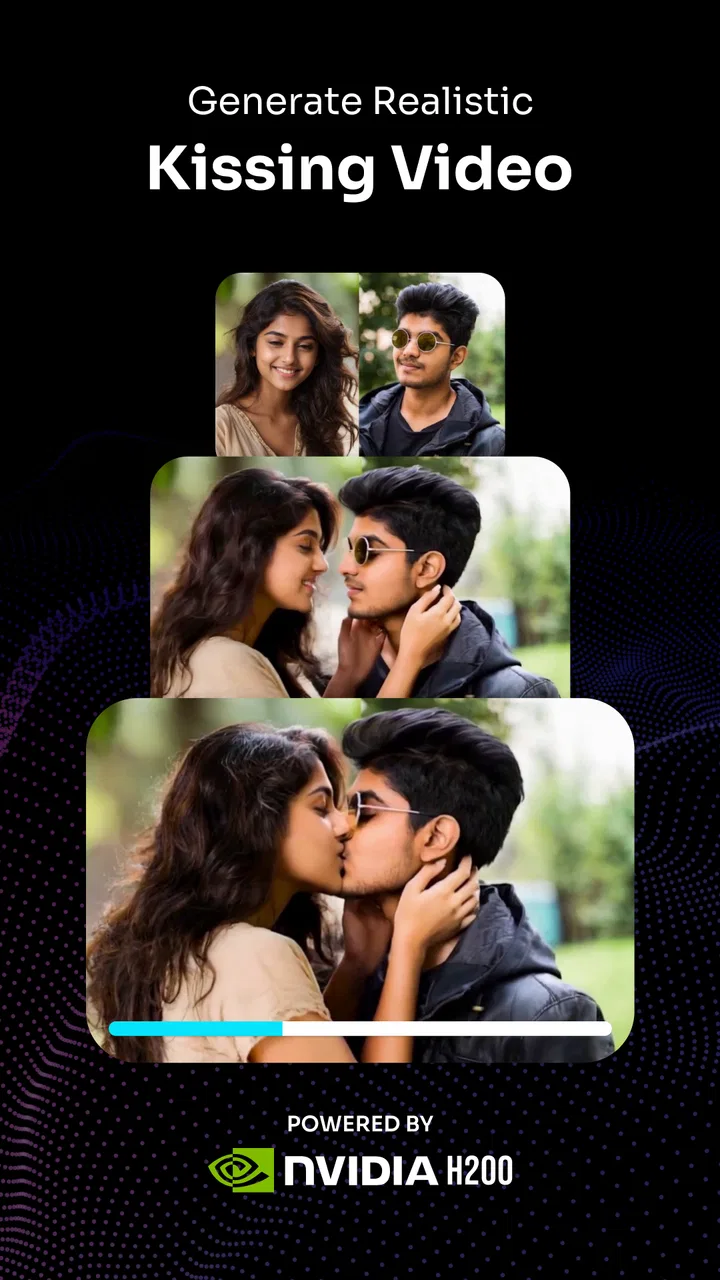
KissMe.ai - AI Kiss Generator
- 3.9
- Rating
- 100.00K
- Installs
- Free
- Price

 Analysis by App-foxy
I approached KissMe.ai as a quick creative experiment rather than a full video editor, and that distinction matters. The app belongs to the Art & Design category and focuses on turning photos into AI-generated kissing videos. That makes it immediately understandable for someone who wants a playful result without learning a timeline, keyframes, masks, or complicated editing controls.
My first impression was that the appeal is less about producing a polished production and more about creating a short, surprising moment from an otherwise ordinary image. It can suit a couple making a private joke, friends preparing a lighthearted message, or someone testing how an AI animation handles faces. The best results depend heavily on the source photo, so I would not treat it as a magic button that fixes every image.
The app is free to install, with optional in-app purchases ranging from twenty cents to just under twenty-nine dollars per item. It is marked for Everyone, and the developer is imotion.ai. Its current version is 2.0.9, while the Android requirement is version 7.0 or later. Those details make it approachable for many Android users, but the purchase model is worth keeping in mind before repeatedly generating clips.
You May Also Like

 Blood Strike: 2.5 Anniversary
Blood Strike’s Loadouts Turn Every Drop Into a Tactical Gamble
A close look at Blood Strike’s custom loadouts: how fast access to signature weapons reshapes its battle royale rhythm, rewards preparation, and narrows the gap between fights.

 Pandora - Music & Podcasts
Pandora’s Music Is Easy to Start, but Harder to Recover
Pandora’s strength is its low-effort path from a seed to a station. Its weak spot is how much confidence it asks you to place in connection, setup, and quiet recovery.

 8 Ball Pool
8 Ball Pool Is Built on Rivalries, Rematches, and Routine
A close look at the rivalries, rematches, shared routines, and unanswered safety questions that turn a quick pool match into a persistent mobile community.

 Samsung Music
Samsung Music’s Quiet Strength Is Playing What You Already Own
Its reach comes less from spectacle than from dependable access to a personal library. That simplicity is both the app’s strongest retention engine and its ceiling.

 AccuWeather: Weather Radar
AccuWeather Review: A Quick, Clear Forecast for Everyday Decisions
For everyday plans, the best forecast is the one you can understand quickly. AccuWeather makes rain timing, radar, and local conditions easy to act on, with a few trade-offs.

 Hill Climb Racing
Why Hill Climb Racing Still Turns Crashes Into One More Run
A tiny car, a bumpy hill and one more upgrade: Hill Climb Racing keeps resurfacing because its simple chaos makes every near-miss feel personal.
More From Our News Desk



What to expect from the first launch
The store summary describes the main idea clearly: create realistic AI kissing videos from photos using Seedance 2.5. In practical terms, I would expect a focused workflow rather than a broad collection of drawing tools or a general-purpose animation studio. You start with an image, guide the app toward the intended result, and wait for the generated video.
That narrow purpose is one of its strengths. There is no need to search through a large library of unrelated effects before reaching the central feature. At the same time, the narrow scope means this is not the right choice if your goal is to edit a complete social video, arrange music, add captions, or build a multi-scene story. A traditional mobile editor will be more useful for those jobs.
The word “realistic” should also be understood carefully. AI video generation can make a convincing impression when faces are clear, expressions are relaxed, and the people are positioned in a way that leaves room for movement. It can look less natural when faces are partly hidden, turned sharply away, very small in the frame, or affected by strong shadows. I found that the input image is effectively the first editing decision.
For a first attempt, I would choose a well-lit portrait with both faces visible, similar in size, and separated from a busy background. A simple image usually gives the model fewer visual problems to solve. A crowded group photo may be funny to try, but it also increases the chance that the wrong faces or awkward movement become the focus.
Choosing a photo that gives the generator a fair chance
A useful trick is to prepare the image before opening the app. Crop away unnecessary scenery, keep the faces large enough to read clearly, and avoid photos where hands, sunglasses, hair, or other objects cover the mouth. This is not about making the picture beautiful; it is about giving the animation system a clean starting point.
I would also avoid using a screenshot of a screenshot or an image that has already been heavily compressed. Fine facial details can disappear during repeated sharing, and those details are exactly what an AI animation needs to preserve identity and expression. If you have several suitable pictures, begin with the simplest one instead of the most dramatic one.
There is a social consideration too. A realistic-looking affectionate video can be misunderstood when shared without context. I would only use images of people who are comfortable with the idea, especially if the result might be posted publicly. A private joke between friends is very different from creating a synthetic intimate clip of someone who did not agree to it.
Setting up the first meaningful attempt
After installation, I would keep the first session deliberately small. Open the app, select one image, and aim for one understandable result rather than testing every available option at once. This makes it easier to tell whether a strange outcome came from the photo, the chosen instruction, or the generation itself.
The app’s concept is simple enough that a first-time user should not need a long tutorial to understand the basic direction. Still, AI tools often make people hesitate because they expect hidden settings or a perfect prompt. My advice is to describe the action plainly if the interface allows guidance: identify the people clearly and ask for a gentle kissing motion. Short, direct wording is usually easier to evaluate than an elaborate scene description.
Before confirming a generation, check the preview carefully. Make sure the intended people are visible and that the image is not accidentally rotated, cropped too tightly, or dominated by a background object. This small pause can save a generation attempt and helps avoid blaming the app for a problem that was already present in the source.
Because the app includes purchases, I would pay attention to any on-screen indication that an action may consume a paid item or require a purchase. The free installation does not mean every possible generation is unlimited. If you are experimenting, decide in advance how many attempts you are comfortable making rather than tapping through prompts automatically.
The rating sits at a 3.9 average from around 4.1 thousand ratings, with about 284 written reviews. I read that as a sign of a mixed but meaningful user experience: enough people find the idea worthwhile, while others are likely running into output quality, expectations, or workflow issues. I would therefore approach the first result as a test, not as a guaranteed finished clip.
The first successful action is smaller than you think
For me, a successful first action would not necessarily be a perfectly cinematic kiss. It would be generating a recognizable clip in which the correct two people remain visually coherent and the intended affectionate movement is understandable. That is a more realistic benchmark for a first try, and it gives you a fair way to judge whether another source image is worth testing.
If the first result works, save that as your reference point. Compare later attempts against it rather than judging every generation in isolation. You may notice that a calmer pose, a closer crop, or a different facial angle produces a more natural result. This turns the app from a one-tap novelty into a small creative process.
One non-obvious workflow is to keep the original photo untouched and make a separate cropped copy for the generator. That lets you preserve the full image for other uses while testing a composition designed specifically for animation. It is especially helpful when the original picture contains important scenery but the faces occupy only a small part of the frame.
Another useful approach is to test consistency before adding creative complications. Do not begin with unusual poses, multiple people, dramatic lighting, and a detailed scene request all at once. First establish that the app can handle the faces. Only then try a more playful image. This makes failures easier to diagnose and reduces wasted attempts.
Where first-time users may get confused
The biggest source of confusion is the difference between a photo that looks good to a person and a photo that is easy for an animation model to interpret. A lovely candid shot may have motion blur, overlapping faces, or a side angle that feels natural in a still image but becomes difficult to animate. A plain portrait can produce a better result even if it is less interesting emotionally.
Users may also expect every output to preserve identity perfectly. In my view, the app should be treated as an interpretation of the photo, not a frame-by-frame recording of something that happened. Small changes in the mouth, cheeks, eyes, or hair can affect whether the result feels believable. If facial consistency is essential, this type of generator may not be the right tool for the project.
Another point worth clarifying is the difference between a generated clip and a finished social post. Even when the animation is successful, you may still want to review the beginning and end, check whether the framing feels comfortable, and decide whether the result is appropriate for the intended audience. The Everyone content rating describes the app’s general classification, but it does not remove the need for personal judgment about what you create and share.
Generation time can also shape the experience. AI video creation is not the same as applying a filter instantly, so I would avoid repeatedly pressing controls because the first attempt does not appear immediately. If the interface shows progress, let the process complete before starting another action. Repeated taps can make it harder to know which request is being processed.
Purchases are another area where a newcomer should slow down. The listed range is from $0.20 to $28.99 per item, so the cost difference between a small experiment and frequent use can become significant. I would begin with the free path, inspect the result, and only consider spending money if the app already produces the kind of animation you want. Paying for more attempts will not repair a fundamentally unsuitable photo.
How it compares with ordinary alternatives
Compared with a normal photo editor, KissMe.ai removes much of the manual work. A conventional editor can crop, retouch, add stickers, and create a slideshow, but it will not automatically invent a kissing motion from a still image. If the specific goal is an animated affectionate moment, this app reaches that idea more directly.
Compared with a standard video editor, it is much less flexible. Traditional editors give you control over timing, transitions, sound, text, and the exact order of scenes. They are better when you already have video footage or want to build a polished message. This app is better when the starting material is one photo and the novelty of AI movement is the main point.
It also differs from manual animation apps. Manual tools reward patience and control, allowing you to decide exactly how an illustration or character moves. Here, the convenience comes from handing much of that decision-making to the generator. The trade-off is clear: you gain speed and simplicity but lose precise control over every facial motion.
For a private birthday joke or a quick couple’s message, that trade-off can be worthwhile. For advertising, professional storytelling, or anything where a person’s likeness must remain exact, I would choose a workflow with more direct control and review stages.
Practical scenarios where it makes sense
Imagine finding an old, well-framed photo of you and your partner and wanting to turn it into a playful digital keepsake. I would crop the picture so both faces are prominent, run a simple generation, and review the result privately before sending it. The appeal is the transformation itself: a still image gains a small moment of movement without requiring filming or acting.
A second scenario is a group of friends making a humorous reaction to a shared photo. This is where I would be more cautious. If the picture contains several faces, the app may have a harder time understanding which two people should be involved. A tighter crop with only the intended subjects is a better starting point than relying on a busy group composition.
The app can also be useful for creative concept testing. An illustrator or social creator might use a portrait to explore how an affectionate motion changes the mood of an image before deciding whether to produce a more carefully controlled animation elsewhere. In that role, the output is a visual sketch rather than the final deliverable.
I would skip it for sensitive personal situations, public accusations, or anything that could embarrass someone if the clip were taken out of context. The more realistic the synthetic result appears, the more important consent and careful sharing become. A funny private experiment can become harmful if it is presented as authentic footage.
Three habits that improve the experience
- Use a dedicated crop: make a copy of the original image and frame the faces for the animation, preserving the full photo separately.
- Change one variable at a time: if an output is awkward, try a clearer photo before adding a more elaborate instruction or changing several elements together.
- Judge the result at normal speed: a paused frame can look acceptable while the movement feels unnatural in playback, so review the complete clip before sharing it.
A fourth habit is to keep expectations proportional to the source. If the faces are tiny, profile-only, or partly blocked, I would not spend several paid attempts trying to force a convincing result. Selecting a better image is usually the more effective improvement. This is an important trade-off because the app’s convenience can make it tempting to keep regenerating instead of revisiting the input.
I would also separate “funny” from “successful.” An odd result may still be entertaining, but it should not be mistaken for realism. If your goal is a believable keepsake, choose the cleanest output. If your goal is a joke among friends, an imperfect result may be exactly what makes it memorable.
Who should try it and who should choose something else
I would recommend the app to Android users who want a focused AI art experiment, especially people starting with still portraits rather than existing footage. It is approachable for casual creators, couples, and anyone curious about turning one image into a short, expressive animation. The free entry point makes it easy to test the basic idea before deciding whether it belongs in your regular creative routine.
I would be less enthusiastic for users who need dependable professional output, detailed editing controls, or guaranteed facial accuracy. The rating of 3.9 suggests that the experience will not satisfy everyone equally, and AI-generated motion naturally introduces variation. If every frame must match a real person precisely, a manually controlled production method is safer.
The app is also not ideal for someone looking for a full Art & Design toolkit. Its strength is a very specific transformation, not illustration, layout design, photo retouching, or complete video production. Installing it for those broader tasks would likely lead to disappointment because the central feature is intentionally narrow.
Its age classification of Everyone makes the app broadly accessible, but I would still apply an adult level of care to the images used and the people depicted. Classification and responsible use are separate questions. Before sharing a generated kiss, ask whether the people involved would recognize the joke and feel comfortable with it.
My next-step recommendation
My suggested path is simple: install it, choose one clear two-person portrait, and aim for a basic result before exploring more ambitious ideas. Keep the first image private, watch the entire output, and decide whether the movement feels recognizable and respectful. If it works, try a second photo with only one change, such as a closer crop or calmer pose.
Do not buy additional items merely because the first image was difficult. First improve the source and simplify the request. If the app still cannot produce a result you like, a conventional editor or a more controllable animation workflow will probably serve you better than repeated generations.
After a successful test, you can decide what role the app deserves. It may become a quick tool for playful messages, a way to animate selected memories, or simply a one-time novelty. In my experience, its value comes from that focused surprise: it gives a static photo a small emotional gesture with very little manual work.
My final view is that KissMe.ai is worth trying when you want a fast, playful kissing animation from a suitable photo, but it should be approached as an AI interpretation rather than a guaranteed realistic recording. The app’s clear purpose, free installation, and simple creative premise are inviting. The need for carefully chosen images, attention to purchases, and responsible sharing keeps it from being a universal solution. For the right photo and a lighthearted goal, it can be a fun addition to an Android creator’s toolbox.
FAQs for KissMe.ai - AI Kiss Generator
01What is KissMe.ai – AI Kiss Generator, and how does it work?
KissMe.ai – AI Kiss Generator is an image-editing app that uses artificial intelligence to create or simulate a kissing scene from photos. After selecting suitable images, the app processes facial features, positioning, and expressions to produce a short AI-generated result. The quality depends heavily on lighting, image resolution, face visibility, and whether the people are looking toward the camera.
02Is KissMe.ai free to download and use?
The app may be available to download at no initial cost, but some features or generated results can require in-app purchases, credits, or a subscription. Before creating content, check the current pricing, trial conditions, renewal terms, and any export limitations shown in the app store listing or payment screen. Free access may also include advertisements, watermarks, or restricted generation quality.
03Can I use KissMe.ai with photos of another person?
You should only upload photos when you have permission from the people shown, especially if the generated result depicts intimate or romantic behavior. Creating a realistic kissing video or image of someone without consent can be misleading, harmful, or unlawful depending on your location. Avoid using photos of minors, public figures, strangers, or anyone who has not clearly agreed to the intended use.
04What kind of photos produce the best AI kiss results?
For more convincing results, use clear, high-resolution photos with well-lit faces, minimal blur, and no sunglasses, masks, or heavy obstructions. Images with similar camera angles, compatible head positions, and visible facial features generally work better than group photos or side profiles. Even with suitable pictures, AI results can contain unnatural movements, facial distortions, mismatched skin tones, or other visual errors.
05Are photos and generated videos safe when using KissMe.ai?
Before uploading personal images, review KissMe.ai’s privacy policy and the permissions requested by the app. Pay attention to whether photos are sent to remote servers, how long uploaded files are retained, whether generated content may be used for service improvement, and how deletion requests work. Avoid uploading sensitive images, and do not share generated content publicly unless everyone depicted has provided clear consent.
Pros
- Creates playful AI-generated kissing videos from uploaded photos.
- Simple interface makes the effect accessible to users with little editing experience.
- Useful for sharing humorous clips on social media and messaging apps.
- Can add novelty to ordinary portraits without requiring advanced editing skills.
- Results are generated quickly for convenient casual experimentation.
Cons
- Photo uploads may raise privacy concerns
- especially with personal or sensitive images.
- AI effects can produce unnatural faces
- hands
- or body movements.
- Output quality may depend heavily on lighting
- pose
- and image resolution.
- Some features or exports may require payment
- credits
- or a subscription.
- Generated content may be watermarked or limited in resolution on free plans.

KissMe.ai - AI Kiss Generator
Gallery